

How to stake crypto?
Staking in NOW Wallet takes about a minute once you know what you're doing.
Here's the actual process:
- Open the app
- Pick a coin
- (Some cases) Choose a validator
- Enter the amount
- Confirm
That's it. But we'll walk through each step and explain what's happening so you don't feel lost.
Before you start (quick checklist)
-
Do you have a NOW Wallet? If not, download it from the App Store or Google Play and set it up. You'll need to create a wallet and secure your recovery phrase.
-
Do you have crypto to stake? You need coins in your wallet. We support SOL, TRX, NOW (on ETH), and ATOM for staking.
-
Do you have a bit of extra crypto for fees? You might need a small amount of the native coin to cover transaction fees (gas). It's usually minimal.
If you've got these, you're ready.
Step 1: Open your wallet and find the staking section
Launch NOW Wallet. In your portfolio tap on the staking icon This opens the staking interface.
Step 2: Pick the coin you want to stake
You'll see a list of available coins for staking:
- SOL (Solana)
- TRX (Tron)
- NOW (ChangeNOW Ecosystem token)
- ATOM (Cosmos)
Select the one you want to stake.
Step 3: Choose a validator (for native coins)
A validator is a node operator maintaining the blockchain. When you stake, you're delegating your coins to a validator. They use your stake to help secure the network, and in return, you earn rewards.
The differences between validators are typically small. One thing to watch: if a validator misbehaves and gets slashed (penalized by the network), stakers who delegated to them lose a portion of their stake. It's rare, but it happens. Stick with validators that have a solid track record and high uptime.
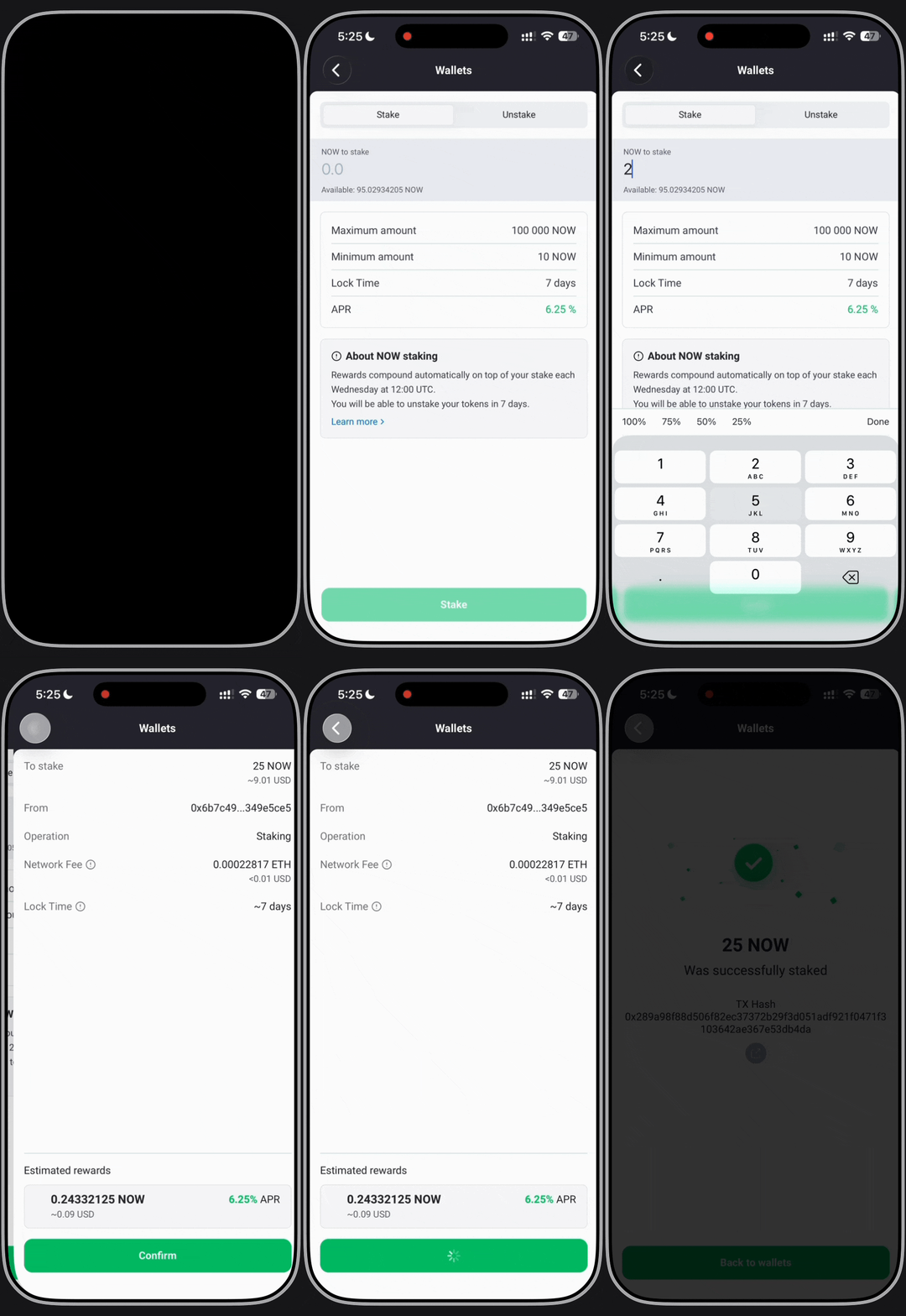
Step 4: Enter the amount you want to stake
You'll see an input field. Type in how much crypto you want to stake (keep in mind the minimum and maximum stake amounts, if any).
Pro tip: Don't stake your entire holdings. Keep some in reserve for:
- Trading opportunities
- Paying for transactions
- Emergencies
Step 5: Review and confirm
Before you hit "Stake," the app will show you:
- Amount you're staking
- Validator you chose
- Estimated rewards
- Transaction fee
Check that everything looks right. Hit "Stake". The transaction goes to the blockchain.
Once you stake, your crypto is locked. You can't immediately sell it. But you can unstake anytime. It might take time to process, depending on the particular coin.
Step 6: Wait and watch your rewards accumulate
That's it. You're staking now.
Your rewards start accumulating immediately (or very soon). On most chains, you'll see them reflected in your wallet within hours or days. Don't expect payouts every day — they batch up and get distributed periodically.
You can close the app and go about your life. Your crypto is working for you in the background.
Want to understand what happens to your crypto when you stake and why networks need stakers? Read our guide on what is staking for the full picture.
Understanding the numbers
APR vs. Actual Returns
The app shows you an APR (Annual Percentage Rate). This is an estimate. Your actual returns depend on:
- How long you actually stake
- Network conditions
- The validator's performance
- Fee changes
Don't expect exactly 5% APR. It's a ballpark number.
Rewards frequency
Different blockchains pay rewards differently:
- Solana: Rewards distributed frequently (almost daily)
- Ethereum: Rewards distributed periodically
- Cardano: Rewards every 5 days
- Tron: Rewards daily
Again, you don't need to do anything. They'll show up in your wallet automatically.
What happens if you want to unstake
Click the staking icon again and select "Unstake." Choose how much you want to unstake.
Your crypto will be released back to your wallet. Timeline varies (usually 1-14 days depending on the blockchain).
Common questions while you're staking
"Why aren't my rewards showing?"
Give it time. Most blockchains take hours to a day to reflect rewards. If it's been more than 24 hours, check if your validator is online and working properly.
"What if the price drops while I'm staking?"
You're still earning rewards. If you stake $1,000 and the price drops 20%, you have $800 worth of crypto earning rewards. Rewards keep coming regardless of price.
"Is there a penalty for unstaking?"
Not on most chains. You just have to wait for the unstaking period. No financial penalty. Some networks might charge a small transaction fee, but that's it.
Pro tips for stakers
Diversify validators. If you're staking a large amount, split it between 2-3 validators. This reduces risk if one validator goes offline.
Check rewards regularly. It's not necessary, but many people like checking their rewards weekly. Seeing that number grow is satisfying.
Don't chase APR. A validator offering 20% APR while everyone else offers 5% is probably scammy. Stick with reasonable rates.
Compound your rewards. Once you earn rewards, you can stake those too. This speeds up compounding.
FAQ
How long until I earn rewards?
Usually within a few hours to a day. Depends on the blockchain.
What's the minimum amount to stake?
Depends on the coin. SOL has a minimum of 1 SOL to stake, ATOM — 0.01 ATOM, and so on. It varies. Check in the app before you stake.
What if my validator goes offline?
Nothing happens to you. You don't get penalized. You just stop earning rewards temporarily. If they stay offline too long, you might want to switch validators, but there's no financial penalty on you.
Can I stake from NOW Wallet on my phone?
Yes, that's exactly what we designed this for. Mobile-first staking.
What's a "delegation" vs. "validation"?
When you stake through the app, you're delegating to a validator. The validator runs the actual node. You're not running hardware yourself. It's simpler and still earns you rewards.