

Where to find my recovery phrase?
Your recovery phrase (aka seed phrase, backup phrase or mnemonic) is the single most important secret for your wallet. It’s the only way to recover your wallet if you lose access to your device — so save it and protect it immediately.
What the recovery phrase / seed phrase means
A recovery phrase is a human-readable list of words that encodes your private keys. Anyone with this phrase can restore or control your wallet — so it must be kept secret and offline.
How to view your recovery phrase
-
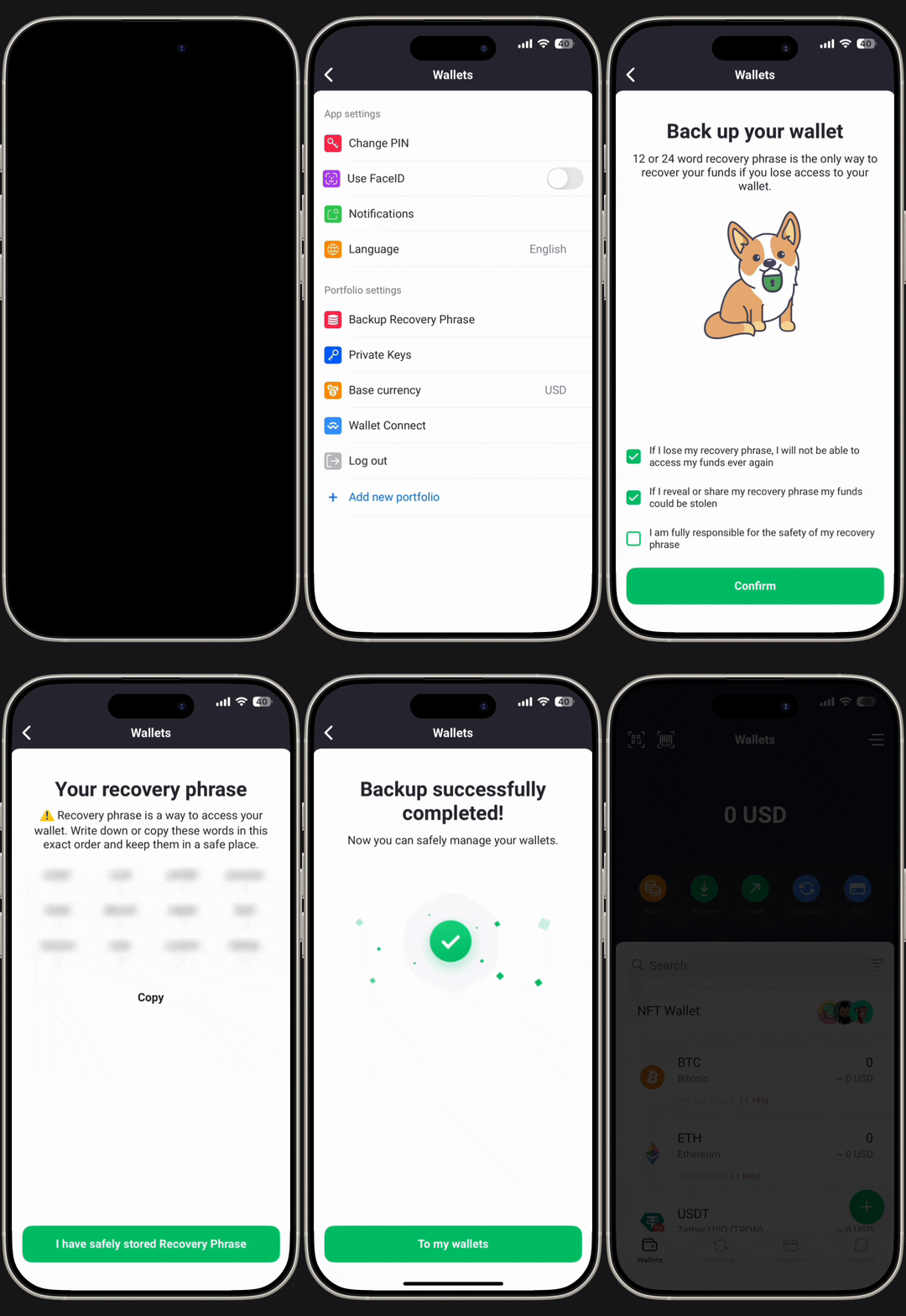
Open the NOW Wallet app and go to Settings.
-
Select the portfolio you want to back up and log in to get the Backup Recovery Phase.
-
Enter your PIN code or device authentication — the recovery phrase (12 words) will be revealed on-screen.
Tip: Do this in private. Do not take screenshots or store the phrase in cloud notes.
Still need help?
If you’re unsure how to back up or test your seed phrase, contact NOW Wallet Support. Do not send your recovery phrase to support — we cannot and will not accept it.