

How to install NOW Wallet?
Setting up NOW Wallet takes just a minute — whether you’re using Android or iOS. Follow this quick guide to download and install a non-custodial crypto wallet and get ready to manage your digital assets securely.
Step-by-step guide:
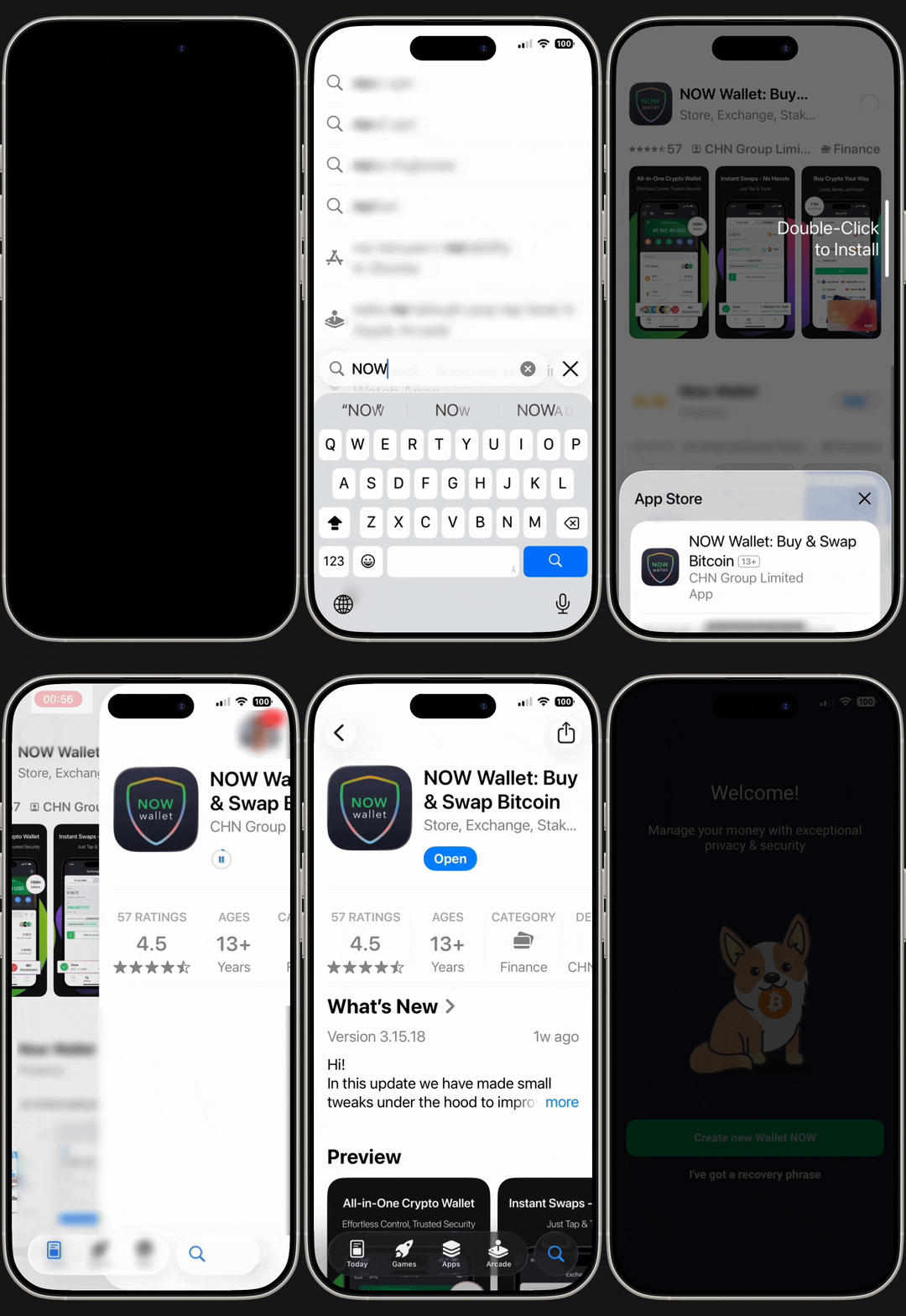
- Go to the App Store or Google Play on your device.
- Search for the NOW Wallet app.
- Tap on Install to download.
- Once the download is finished, open the app to start your setup.
Tip: Always make sure you are installing the official NOW Wallet app to keep your crypto secure from fake wallet apps.
What happens after installation?
Once you install NOW Wallet, you’ll be able to:
- Create a new non-custodial crypto wallet
- Import an existing wallet using your seed phrase
- Store, send, and receive cryptocurrencies
- Access instant crypto-to-crypto swaps directly in the app
- Manage NFTs and multiple blockchain networks from one interface
- Connect to compatible web3 dApps simply by scanning a QR-code.
FAQ menu

Crypto wallet
What is a DeFi wallet?Why do you need a crypto wallet?How does a crypto wallet work?Custodial vs Non-Custodial Wallets: which is better?What is NOW Wallet?What's the difference between ChangeNOW and NOW Wallet?Hot vs Cold wallets: What's the difference?Is there a desktop version of NOW Wallet?How many crypto wallets can you have?What is the best crypto wallet for beginners?
Manage my assets
How to send and receive crypto in NOW WalletWhat is Private Send?How to exchange crypto in NOW WalletWhy should you exchange crypto directly in your wallet?What affects crypto transaction speed?What are dApps?What are perpetual futures (perps) in crypto?What are prediction markets in crypto?How to use perps and prediction markets in NOW WalletWhat are network fees? What is an ETH gas fee?What is GasFree USDT and how to use it?Can I use a hardware wallet with NOW Wallet?How to transfer funds from MetaMask to NOW WalletHow to diversify a crypto portfolioHow to buy RWAs in NOW WalletWhich cryptocurrencies does NOW Wallet support?What should I do, if my token is not listed?What are wrapped tokens?How to safely transfer funds from Trust Wallet
Support and Troubleshooting
Getting started with NOW Wallet
Security
NFT’s and Staking